Galaxy S3 Go Theme and Locker 3.3 Download
 Overview: Try the New GS3 TouchWiz Nature UX Go Theme & Locker. The Sexiest Ever!
 Requirements: Android 2.0 and up
Make sure your Go Launcher EX to have the following TWO settings in order to get the same apperance of the screenshot above,
(A) Homescreen> MENU Key> Preferences> Visual settings> Icons> Uncheck Icon base
(B) Homescreen> MENU Key> Preferences> Visual settings> Icons> Icon size> Default size (small)
===This is a Theme for Go Launcher EX & Go Locker===
*****The Newly Realistic GS3 Galaxy S III TouchWiz Nature UX Theme for Go Launcher EX with Go Locker is here!*****
•••••This Theme is still in development, we will keep UPDATING and IMPROVING very frequenctly•••••
★Before Using:
1. You need to have:
The latest version of GO Launcher EX and Go Locker installed to access the theme.
(Search "GO Launcher EX" & "Go Locker" via Google Play Store to download)
2. To apply the theme within GO Launcher EX:
"Menu> Preferences> Theme>S3 Touchwiz 5 Go Launcher EX Theme>Apply"
(Attention: It will set your wallpaper to the selected theme’s wallpaper automatically.)
3. If icon on homescreen is not replaced by my theme's icon, please replace the theme icon manually:
"Long Pressed the icon>Replace>Theme’s icon>S3 Touchwiz 5 Go Launcher EX Theme>locate the icon"
★Choosing Wallpapers
1. In the homescreen of Go Launcher EX, press "Menu" key.
2. Then, press "Wallpaper"
3. Select "Go Wallpapers"
4. Choose your favorite wallpaper
★Features
1. New TouchWIz UX Nature Locker with 4 Shortcuts at the bottom.
( Work on all resolution )
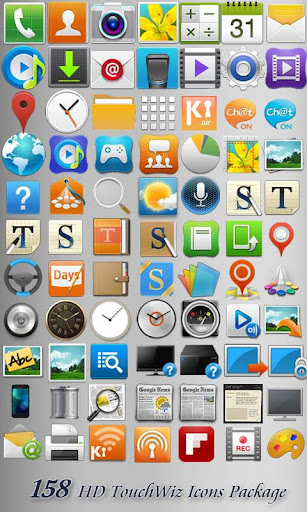
2. 30+ HD TouchWiz UX Nature icons
3. 30+ HD TouchWiz 4 Galaxy S2 (i9100) icons
4. 30+ HD TouchWiz icons from Galaxy Note (N7000) ice-cream Sandwich
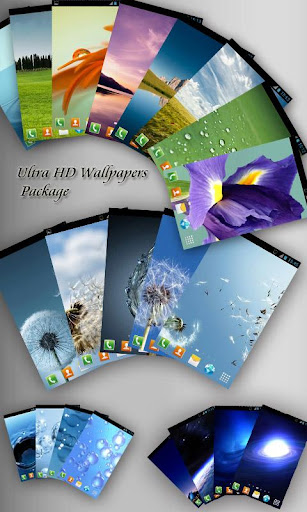
5. 25 Natural HD Wallpapers
6. Missed Call, Missed SMS, Alarm, Charging Notification icon in Lockscreen
7. App2SD (Allow to move apps to SD Card Memory)
★To Optimize this theme
For better outlook, please follow the instruction below:
a) MENU>Preferences>Visual Settings>Icons>Icon Size>Default Size(Small)
b) MENU>Preferences>Visual Settings>Indicator>Indicator position>Bottom of screen
c) MENU>Preferences>Screen Setings>Grid Size>Tight (5x4)
d) MENU>Preferences>Visual Settings>Icons>Icon base>Uncheck icon base


Buy Link
https://play.google.com/store/apps/details?id=com.gau.go.launcherex.theme.touchwizfive
Download link
http://extabit.com/file/28elufsiiidg9
http://rapidgator.net/file/20409951/gs3.Go.Theme.and.Locker.3.3.Android.zip.html

